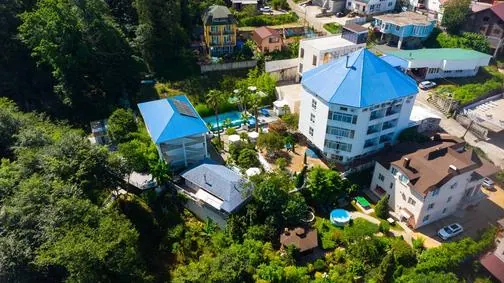
 From the directory
Sochi · Russia
Narayana Center
A space for retreats, practices and group programmes.
NaturePractice hallsCatering
Explore the spaces NARAYANA SPACESSpaces & Events Platform
For space owners · Narayana Spaces
Present the place you have created. Find programmes that fit — and build a clear journey from enquiry to arrival.
Retreat centres · eco hotels · countryside venues
01 · List your space
Go beyond a beautiful photo. Show how people stay, practise and host events here, so an enquiry fits your place from the start.
From the directoryA space for retreats, practices and group programmes.
A listing is not owner verification. Authority is confirmed by a moderator.
02 · Receive relevant enquiries
Dates, group size and requirements come together. You can quickly see whether an event fits your space.
Which programmes fit your space?
These examples show the structure of a future enquiry, not real leads.
A quiet setting for morning practice and a four-night group stay.
03 · Manage arrivals
Rooms in rows, nights in columns. Bookings, holds and maintenance have distinct colours, labels and symbols.
Room calendar
Scroll sideways to explore dates
| Room / category | Mon12 | Tue13 | Wed14 | Thu15 | Fri16 | Sat17 | Sun18 |
|---|---|---|---|---|---|---|---|
| 101Suite · terrace | |||||||
| 102Suite · terrace | |||||||
| 201Twin · garden | |||||||
| 202Twin · garden | |||||||
| 301Eco cottage | |||||||
| 302Eco cottage | |||||||
Select a booking or an available night. The date selector updates the overview. All data is fictional; your selection saves or books nothing.
This illustrates the planned workspace. Live PMS, bookings, payments and synchronisation need separate activation and validation; this demo performs none of them.
04 · Team and enquiry channels
The owner sees the overview. The manager handles enquiries. Front desk prepares arrivals. Individual roles replace a shared password.
Channels help people discover your space, but do not guarantee enquiries, revenue or occupancy.
Propose a centre eventProperty listing, team membership and access rules. Important changes retain their author and history.
05 · Getting started
You do not need everything on day one. Start with an accurate listing and a verified representative.
If the property is listed, confirm your authority to manage it. Otherwise, start a new listing.
Add current photos, accommodation, halls, catering and clear conditions.
Choose a responsible person and agree on the workflow. Operations modules are introduced in stages.
This version opens a demonstration entry screen. It sends no data and does not yet create an account or listing. Working modules are introduced in stages.